Many people start proxy selection with one question: which proxy type is the best?
That question sounds simple, but it usually leads to the wrong decision. An ISP proxy, a residential proxy, and a data center proxy are not three quality levels of the same product. They are three different network paths built for different jobs.
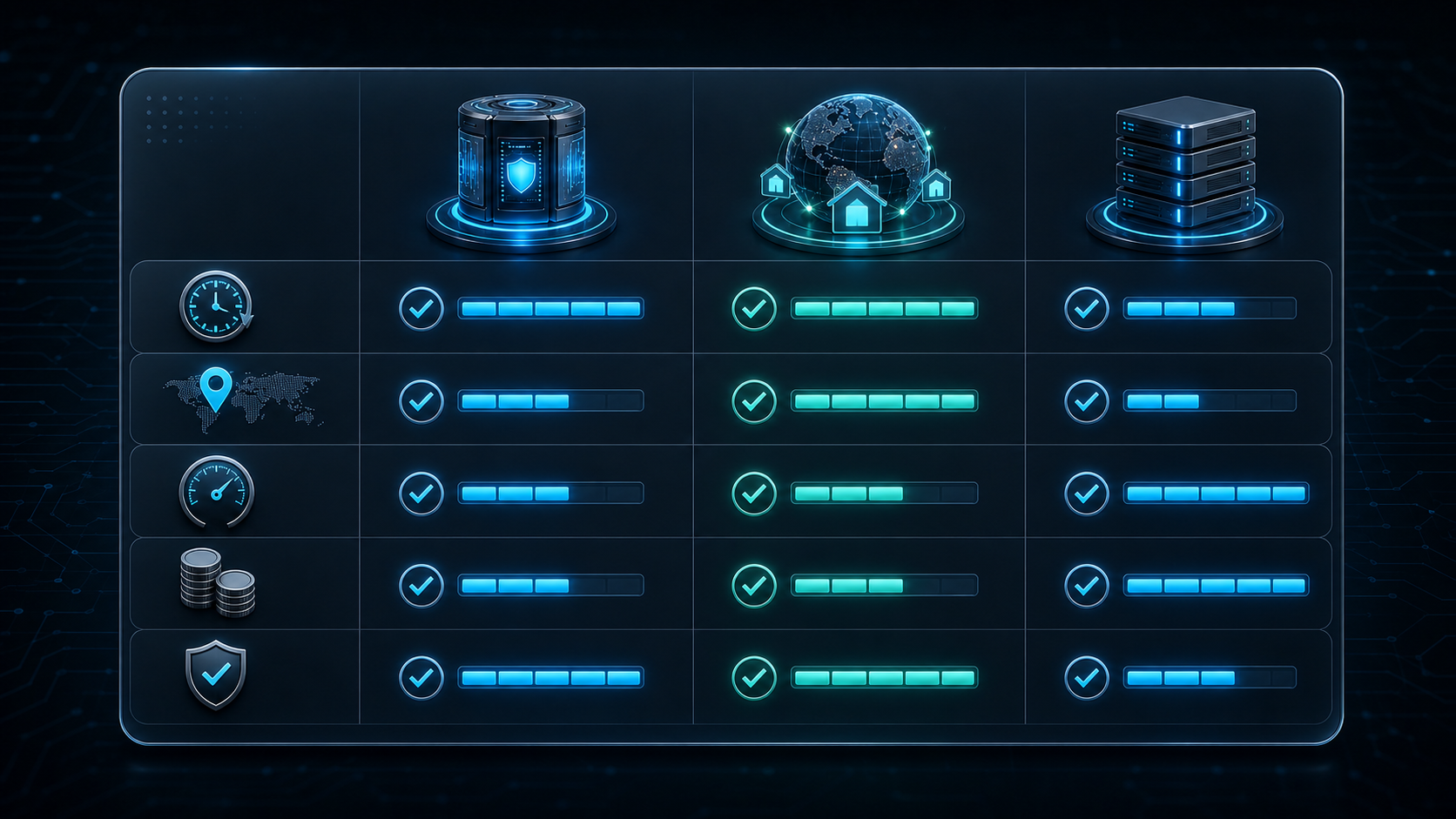
If your workflow needs a long stable session, start with an ISP proxy. If your workflow needs wide address coverage and multi-region observation, start with a residential proxy. If your workflow only needs speed, low cost, and simple access to public pages, a data center proxy may be enough.
This guide explains the difference between ISP proxy, residential proxy, and data center proxy from a business workflow perspective. It will help you choose the right proxy type for search monitoring, ad verification, localization testing, account environments, public web data collection, and basic batch access.
Public web data collection, multi-region sampling, price and stock monitoring, global page checks
Long fixed sessions
Data center proxy
Speed, low cost, simple deployment
Public page access, internal testing, low-risk batch tasks
High-value accounts and sensitive regional checks
In one sentence:
An ISP proxy solves for stability, a residential proxy solves for coverage, and a data center proxy solves for efficiency.
Do not choose by name first. Do not choose by price first. Ask what your workflow is most afraid of.
If it is most afraid of a changing access environment, test an ISP proxy first. If it is most afraid of limited regional samples, test a residential proxy first. If it is most afraid of high cost or slow access, test a data center proxy first.
What Is an ISP Proxy?
An ISP proxy is usually chosen when a workflow needs a more stable network identity. It is often used for long sessions, fixed regional views, and repeatable checks.
Its biggest value is not opening a large number of pages once. Its value is keeping a business workflow under a more consistent network condition.
For example, imagine you check the same group of search keywords every day. Or you review the same ad landing page in one target market every week. If the network exit keeps changing, it becomes hard to tell whether the result changed because the business changed or because the access environment changed.
That is where an ISP proxy can be useful.
Common ISP proxy use cases include:
Use Case
Why an ISP Proxy Fits
Long sessions
A more continuous network route supports repeat access
Search result monitoring
A fixed regional view makes results easier to compare
Ad landing page verification
Stable access helps repeat the same market check
Deep localization testing
Useful for walking through a full regional user flow
Account environment consistency
Reduces one source of network change
An ISP proxy is not a magic account safety tool. It cannot replace platform rules, compliant usage, reasonable access frequency, or clean operational records. It only provides a better network foundation for workflows that need continuity.
What Is a Residential Proxy?
A residential proxy is usually chosen for coverage and regional observation.
It is a strong fit when a workflow needs many regions, many pages, or many samples. Public web data collection, price and stock monitoring, global page checks, brand visibility monitoring, and regional page sampling often benefit from residential proxy coverage.
The main advantage of a residential proxy is flexibility. It can help teams observe public pages from more network environments and more market views. It is not designed primarily to keep one session fixed forever. It is designed to help you see more differences across markets.
For example, if you need to compare product prices, stock status, currency, language, delivery options, and page versions across multiple countries, one fixed exit is not enough. A residential proxy can be a better fit for broad observation.
Common residential proxy use cases include:
Use Case
Why a Residential Proxy Fits
Public web data collection
Many pages and samples need more flexible exits
Multi-region page checks
Useful for observing page differences across markets
Price and stock monitoring
Different markets may show different price and inventory results
Global page checks
Helps find language, currency, redirect, or cache issues
Brand content monitoring
Expands public page visibility across regions
The key is not to rotate as fast as possible. The key is planned rotation. Region settings, session length, access frequency, retry rules, and logs should be designed before the workflow starts.
What Is a Data Center Proxy?
A data center proxy is usually chosen for speed, cost, and deployment efficiency.
It often comes from centralized server infrastructure. Its strengths are fast access, lower cost, simple configuration, and easier scaling for low-risk tasks.
If your workflow does not depend heavily on residential network signals, regional authenticity, or long account continuity, a data center proxy may already be enough. Not every task needs a higher-cost proxy type.
Common data center proxy use cases include:
Use Case
Why a Data Center Proxy Fits
Internal connectivity testing
Mainly checks whether a target is reachable
Simple public page access
Fast and cost-efficient
Batch screenshots
Strong fit for speed-first tasks
Low-risk tool testing
The goal is workflow validation, not realistic user simulation
Simple data checks
Page rules are straightforward and retry cost is low
The limitation is also clear. A data center proxy may look more like server traffic. For account workflows, ad verification, search result monitoring, and localization testing, it may not provide the same natural access environment as an ISP proxy or a residential proxy.
So a data center proxy is not bad. It simply has clear boundaries.
The Five Biggest Differences
The practical difference between ISP proxy, residential proxy, and data center proxy shows up in five areas.
1. Session Stability
If a workflow needs the same network condition for a long time, an ISP proxy is usually the better fit.
A residential proxy depends on the specific product and rotation rules. A rotating residential proxy may be excellent for coverage, but it may not be ideal for long stable sessions.
A data center proxy can be technically stable, but that does not mean the destination website sees it as a natural user-like environment.
2. Regional Coverage
If you need one target region for repeated checks, an ISP proxy is often stronger. If you need many regions and broad market observation, a residential proxy is often stronger. If region does not matter much, a data center proxy may be the fastest and simplest option to test.
3. Speed and Cost
A data center proxy is usually strong on speed and cost. An ISP proxy is usually better for higher-value stability tasks, but it may cost more. A residential proxy can vary more in speed and cost depending on region, quality, and traffic model.
4. Repeatable Results
Search monitoring, ad verification, and localization testing all need repeatable results. The team needs to compare today's result with tomorrow's result under similar conditions.
This is where an ISP proxy is often more useful. It reduces one major source of noise: the access environment.
5. Scale and Flexibility
For multi-region sampling, public page inspection, and broad market checks, a residential proxy is more flexible. Its advantage is range, not fixed continuity.
A data center proxy can also scale, but it is usually better for low-risk, speed-first workflows.
Which Proxy Type Should You Choose by Workflow?
Choosing by business workflow is easier than choosing by technical name.
Search Result Monitoring
Start with an ISP proxy.
Search results can vary by location, language, device, time, and network context. If you use a different exit every day, ranking changes become harder to interpret. A more stable regional view makes long-term comparison more reliable.
Ad Landing Page Verification
Start with an ISP proxy.
Ad verification often checks region, language, price, offer, redirect path, and final landing page content. If the access environment changes too much, it becomes harder to repeat the same market check.
Localization Testing
It depends on scope.
If you are testing a full user flow in one target market, use an ISP proxy first. If you are scanning many countries for page differences, a residential proxy can be more useful.
Public Web Data Collection
It depends on scale.
For large public page collection across many markets, a residential proxy is usually a better fit. For low-risk pages where region does not matter, a data center proxy may be enough. For fixed-source, low-frequency, repeat checks, an ISP proxy is worth testing.
Account Environment Workflows
Start with a stable exit, which usually means testing an ISP proxy first.
Account-related workflows usually do not benefit from frequent network changes. But a proxy alone cannot guarantee account health. Platform rules, device environment, access behavior, and operational consistency still matter.
Basic Batch Access
Start with a data center proxy.
If the task is only opening public pages, testing a tool workflow, or creating basic screenshots, a data center proxy is usually more cost-efficient and easier to deploy.
That can work for low-risk tasks. If the task is simple public access, internal testing, or batch screenshots, a data center proxy may be the better value.
But for high-value workflows, the real metric is usable result cost.
Usable result cost includes:
Cost Type
What It Means
Resource cost
Plan price, bandwidth cost, concurrent access cost
Retry cost
Extra runs needed after failed or unclear results
Manual review cost
Screenshots, diagnosis, result cleanup, reporting
Decision cost
Wrong conclusions caused by unstable access conditions
Opportunity cost
Missed ad errors, ranking changes, page issues, or market signals
A proxy with a lower unit price is not always cheaper if the results are often unusable.
A proxy with a higher unit price may be more cost-effective if it reduces retries, manual review, and wrong decisions.
So the real difference between ISP proxy, residential proxy, and data center proxy is not only technical. It is also about how reliably each one produces business-ready results.
How to Test Before Buying at Scale
Do not start with a large plan. Run a small real workflow test first.
Use this five-step process:
First, define the workflow. Is it search monitoring, ad verification, localization testing, account environment work, public data collection, or basic access?
Second, define the target region. Do not rely only on a proxy checker. Open the actual target page and confirm language, currency, price, stock, redirect path, and page version.
Third, test stability. Run the same workflow multiple times and compare whether the page result, region result, session state, and access path stay usable.
Fourth, record errors. Track failures, timeouts, redirect issues, page differences, region mismatch, and manual review notes.
Fifth, calculate usable result cost. Do not stop at connection success. Measure how many results can actually support a business decision.
Common Selection Mistakes
Mistake one: assuming an ISP proxy is always best. It is strong for stable sessions and repeat checks, but it is not always necessary for low-cost batch access.
Mistake two: assuming a residential proxy is always the most realistic choice. Residential proxies are strong for coverage, but frequent rotation can hurt workflows that need session continuity.
Mistake three: assuming a data center proxy is not useful. Data center proxies are useful for low-risk, speed-first, cost-sensitive workflows. The key is not to use them for every high-sensitivity task.
Mistake four: judging only by address count. Address count is not enough. Region accuracy, session stability, usable result rate, failure rate, and troubleshooting cost all matter.
Mistake five: skipping a real workflow test. Different sites, regions, tools, and workflows behave differently. A real test is more reliable than a spec sheet.
Final Summary
What is the difference between an ISP proxy, a residential proxy, and a data center proxy? The real difference is stability, coverage, and efficiency.
An ISP proxy is better for long stable sessions, search monitoring, ad verification, deep localization testing, and account environment consistency. A residential proxy is better for multi-region coverage, public web data collection, price and stock monitoring, global page checks, and brand content observation. A data center proxy is better for speed-first, cost-sensitive, low-risk public page access and basic testing.
The professional way to choose is not to buy the most expensive option or the cheapest option. The professional way is to match proxy type to workflow risk.
If the workflow is most afraid of environment changes, test an ISP proxy first. If the workflow is most afraid of limited coverage, test a residential proxy first. If the workflow is most afraid of cost, test a data center proxy first.
Start small, measure usable results, and scale only after the workflow proves the proxy type is the right fit.
Frequently Asked Questions
What is the difference between an ISP proxy, a residential proxy, and a data center proxy?
An ISP proxy focuses on stable sessions and fixed network identity. A residential proxy focuses on regional coverage and flexible address rotation. A data center proxy focuses on speed, lower cost, and deployment efficiency.
Which proxy type is best for search monitoring?
If you need long-term monitoring from a fixed target region, start with an ISP proxy. It helps reduce noise caused by changing access environments.
Which proxy type is best for web data collection?
For large-scale public web data collection across many pages or regions, a residential proxy is often a better fit. For low-risk public pages where region does not matter, a data center proxy may be enough. For fixed-source repeat checks, test an ISP proxy.
Are data center proxies bad for business use?
No. Data center proxies are useful for public page access, internal testing, batch screenshots, and low-risk workflows. Their limitation is that they may look more like server traffic, so they are not ideal for every high-sensitivity scenario.
What should I test before buying a proxy plan?
Test target region accuracy, page result consistency, session continuity, access speed, failure diagnosis, and usable result cost before scaling.