Many teams buy a dedicated IP and then ask the same question: how do you actually use it without wasting it?
If you only paste a proxy address into a browser or tool, you may be able to visit a page, but that does not mean the setup is complete. For business work, the value of a dedicated IP is not just having one more exit address. Its real value is in putting accounts, permissions, regions, allowlists, logs, and exception handling into one stable workflow.
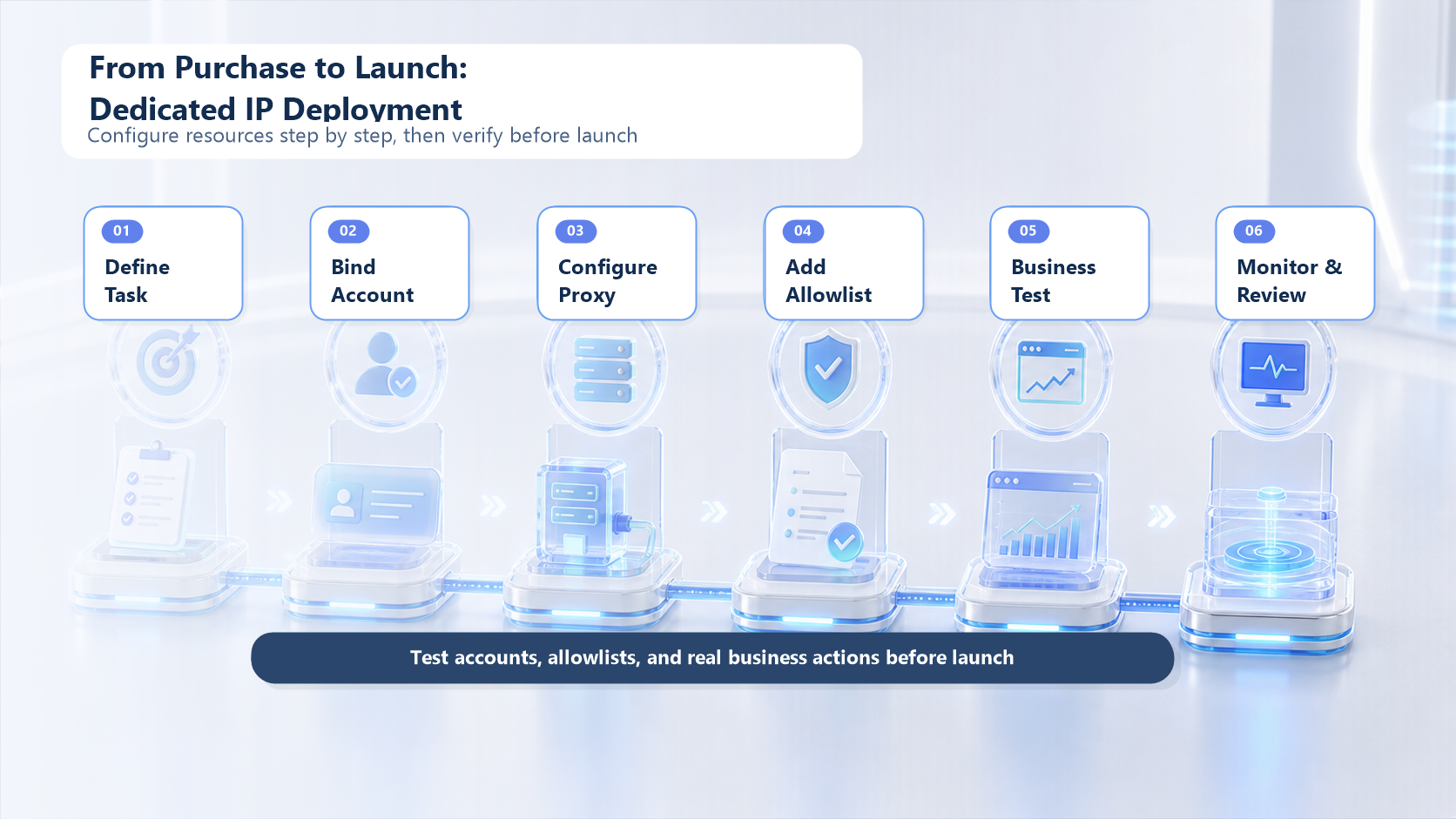
In short, the right way to use a dedicated IP is not to "buy an address." It is to build a stable business chain: define the task, bind the account, configure the proxy, add the allowlist, test the launch, and then monitor it continuously.
This article is written for teams working on account logins, ad verification, cross-border operations, data collection, internal system access, risk isolation, or long-term proxy access.
Put the Dedicated Proxy Into the Workflow, Not Just Into the Tool
Many first-time users ask: "Where should I fill in this address?"
That question matters, but it is not the first step. The real first step is this: which business object should this dedicated IP serve?
You can group business objects into four categories:
Business object
What to configure
What not to do
Platform accounts
Login environment, region consistency, and activity frequency
Mix multiple accounts on one exit without a rule
Internal systems
IP allowlist, permission boundaries, and access logs
Give the same address to everyone
Collection tasks
Visit cadence, retry policy, and compliance boundaries
Focus only on concurrency and ignore records
Client projects
Dedicated resources, delivery records, and issue tracking
Fail to separate clients and tasks
A dedicated IP is closer to a fixed network identity than to a random outgoing address. It works best when it is bound to one account group, one project, one permission boundary, or one long-term task chain.
If you treat it as a "dedicated identity," the rest becomes much clearer: who uses it, what it is used for, which region it belongs to, which tools can reach it, and who is responsible when something goes wrong.
If you treat it as "just another proxy address," three problems appear quickly:
First, the relationship between account and address becomes messy. Today Account A uses this exit, tomorrow Account B uses the same one, and the day after a scraping tool connects through it. When verification or access issues appear, nobody knows where they came from.
Second, allowlist ownership becomes unclear. Internal systems may accept only fixed IPs, but if multiple people use the same address for different jobs, the boundary looks fixed while the actual responsibility is not.
Third, test results lose value if you do not record the context. A successful connection does not prove long-term business stability. Without logs for login time, target platform, region, failure reason, and retry count, you cannot tell whether the issue came from the proxy, the account, the platform, or the tool.
Before using a dedicated IP, write a simple "usage card":
Field
Example
Use case
Account login, ad verification, internal allowlist, or public web access
Bound object
Account group, client project, business system, or tool task
Region
Chosen to match the business target region
User
Responsible person and backup owner
Access tools
Browser, fingerprint browser, collection tool, or internal system
Risk boundary
Not for unrelated tasks, not shared casually, not switched randomly
Monitoring metrics
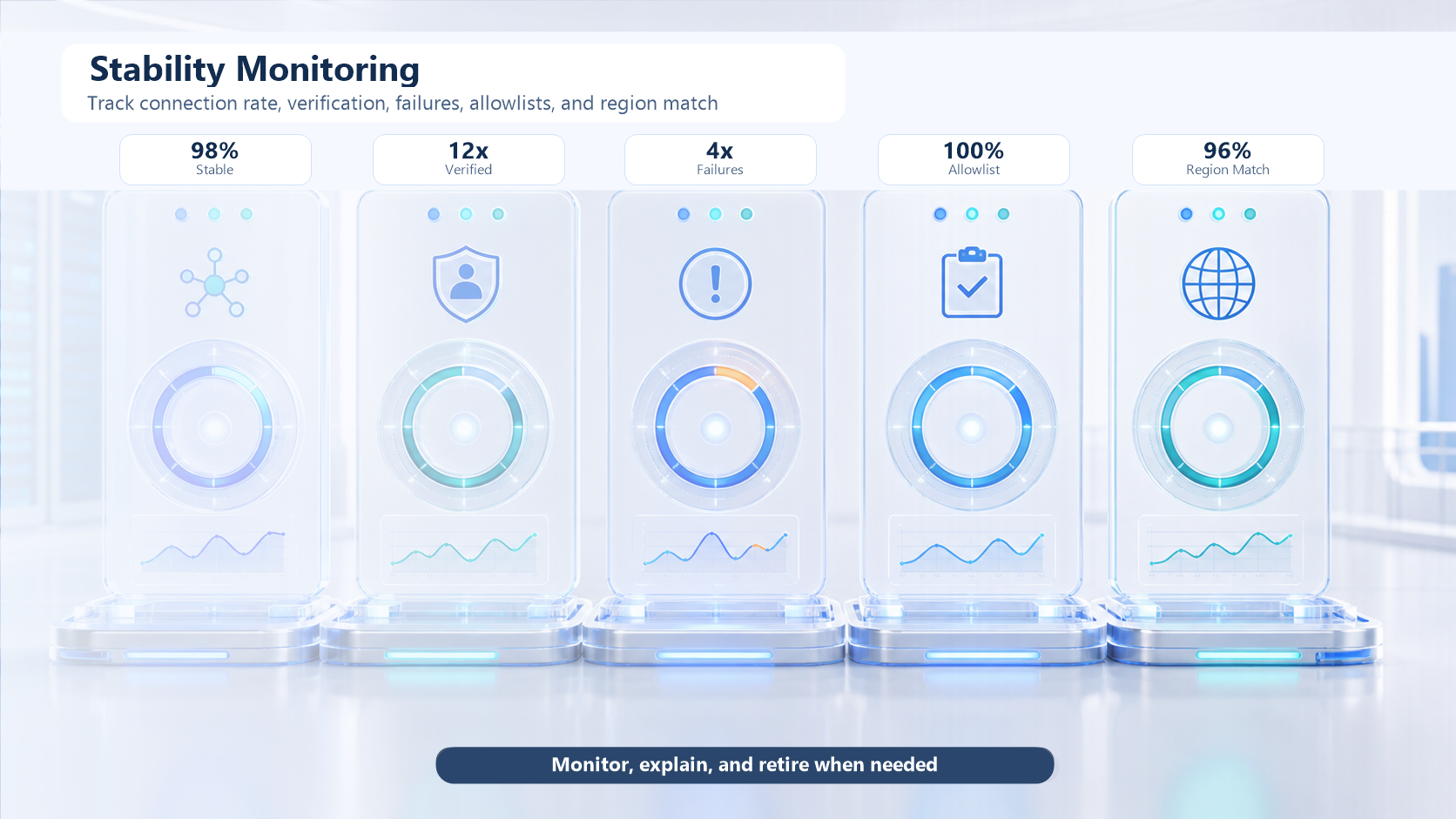
Connection rate, login anomalies, verification count, and access failure rate
This looks basic, but it is what determines whether a dedicated proxy can actually deliver value later.
Account Login: Consistency Matters More Than a Fixed Address
Many teams use a dedicated proxy to improve account stability. There is one important detail here: account stability is not determined by IP alone.
Account environment usually includes login region, device environment, browser fingerprint, login frequency, behavior patterns, account profile, platform rules, and network exit. A dedicated IP only solves the network exit part. It cannot replace full account management.
But it is still very important. The reason is simple: if the network exit changes every day, the platform sees a changing login environment too. For long-term accounts, backend systems, cross-border operations, ad accounts, or tool accounts, frequent identity changes may trigger extra verification.
When using a dedicated IP for account logins, follow these four steps:
First, group the accounts. Do not let every account share one random line. Group by platform, region, client, business type, or owner. High-value accounts should use a more stable dedicated exit, while temporary test accounts can use a more flexible setup.
Second, keep the login entry point fixed. The same account group should use the same device if possible, the same browser or fingerprint browser, the same region, and the same proxy exit. The more often you switch, the harder it is to explain the environment.
Third, control migration speed. If an account has long been used in another region or network environment, do not move everything at once. A more stable way is to test low-risk accounts first, then migrate the core accounts gradually.
Fourth, record anomalies. When SMS verification, email verification, login failure, region prompts, or device prompts appear, do not only look at the result. Record the proxy address, login tool, time, target platform, and action taken. One of the biggest advantages of a dedicated address is that it makes root-cause analysis much clearer.
Use this table as a team checklist:
Check item
Suggested record
Account name
Record an account label, not the password
Fixed exit
Record the proxy address or resource ID
Login region
Match the business target region
Login tool
Browser, fingerprint browser, client app, or internal system
Verification triggered
Record the verification type
Result
Success, failure, or partial success
Follow-up action
Keep monitoring, pause use, or switch setup
If your account is still in the selection stage, you can revisit Dedicated IP vs Shared IP. If you already know you need a proxy tool, you can also check the IPIPD Proxy Tutorial Center for specific integration steps.
IP Allowlists: Make the Permission Boundary Explicit
An IP allowlist is one of the most common dedicated-address use cases.
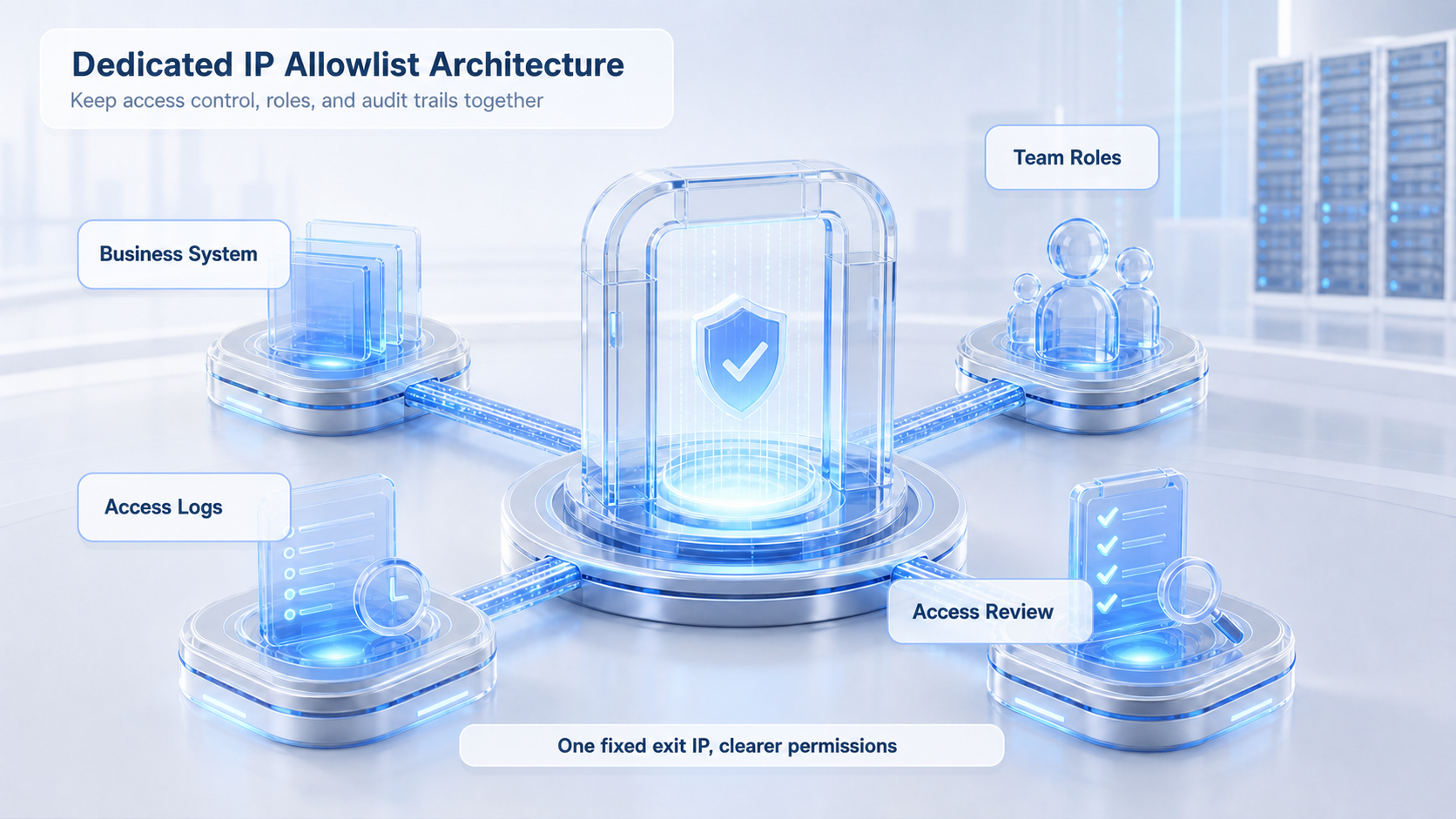
Many backend systems, API services, dashboards, ad accounts, enterprise management systems, or client systems only allow access from a specified network exit. The upside is that the permission boundary becomes clear: if an address is not on the allowlist, even if you know the login entry, you still cannot reach the system.
That is where a dedicated exit becomes valuable. It gives you a relatively stable, recognizable, and manageable address that system owners can safely add to the allowlist.
But an allowlist is not the same thing as security done. Three things still matter:
First, the allowlist should be split by business purpose. Internal office access, client project access, and automation access should not all share the same exit. If one issue appears, it becomes hard to tell which business path caused it.
Second, the allowlist should have an owner. Who requested it, who approved it, who uses it, and who can suspend it should all be recorded. A fixed exit can help with network consistency, but it cannot replace team governance.
Third, the allowlist should be reviewed regularly. A common team problem is not failed configuration but forgotten configuration. The project ends, the account stops, the tool is retired, but the allowlist remains. That leaves the permission exposed for too long.
Use this simple process:
Step
What to do
Why it matters
Request
State which system will be accessed and why
Prevent unrelated use
Bind
Add the dedicated exit to the target system allowlist
Create a fixed access entry
Test
Verify connectivity, login, and permission behavior
Confirm the system really routes through the exit
Authorize
Clarify which team members may use it
Control responsibility
Record
Save the resource ID, system name, and owner
Make review easier later
Review
Check whether it is still needed on a schedule
Avoid long-term exposure
Here it is also important to separate two concepts: an IP address and a proxy server. An IP address is a network identifier. A proxy server is the machine or service that forwards requests. For background reading, you can compare IP Address and Proxy Server, then map that understanding back to your business scenario.
Proxy Tool Integration: Test Business Actions, Not Just Connectivity
Dedicated exit nodes usually need to be connected to a real tool. Common tools include browsers, fingerprint browsers, collection tools, ad verification tools, automation scripts, internal backends, or third-party software.
Different tools place the proxy fields in different places, but the core parameters are usually the same:
Parameter
Purpose
Proxy protocol
HTTP, HTTPS, or SOCKS, chosen by service and tool support
Host
Proxy server address
Port
Connection port
Username
Used if authentication is required
Password
Paired with the username
Region
Match the business target region
Session
Fixed or rotating, depending on the task
Many teams test a proxy by doing only one thing: opening an IP lookup page and checking whether the exit address changed.
That only proves that the proxy can probably connect. It does not prove that the business can run stably. A more complete test should have three layers.
The first layer is network testing. Confirm that the proxy connects, the exit region is correct, the speed is acceptable, and there is no obvious disconnect.
The second layer is tool testing. Confirm that the browser, fingerprint browser, collection tool, or internal system correctly recognizes the proxy and does not leak DNS or fall back to the local network in any important module.
The third layer is business testing. Actually perform one target action, such as logging into an account, opening a backend, visiting a target page, calling an API, previewing an ad, or running a small collection task. Only when business action succeeds does the setup have real value.
Use this launch checklist before going live:
Test level
Test content
Pass standard
Basic connection
Can the proxy connect?
No frequent disconnects
Exit identification
Do IP, region, and operator details match expectations?
Match the purchased resource
Tool integration
Does the target tool route through the proxy completely?
No local network leakage
Account action
Do login, verification, and page load behave normally?
No abnormal high-frequency verification
Business action
Collection, verification, backend access, or API call
When a single person uses a stable exit, problems usually show up in configuration. When a team uses a dedicated exit, problems usually show up in management.
The first kind of confusion is resource mixing.
For example, a dedicated address originally used for platform account login is later borrowed for scraping, and then reused for customer support access. It may feel efficient in the short term, but in the long run the network identity becomes unclear. Once something breaks, account work, collection tasks, and client systems can all affect one another.
The second kind of confusion is unclear ownership.
Who requested the resource, who uses it, who can see the password, who handles incidents, and who decides to retire it should all be written down. Without these rules, a dedicated exit slowly turns into a shared password with a fixed address.
The third kind of confusion is missing review.
One advantage of a dedicated line is traceability. If the team does not record the usage result, that advantage disappears. For example, if one address triggers verification three times in a row, one tool often disconnects, or one region becomes slow, you need logs to know whether the problem came from the proxy, the account, the tool, or the target platform.
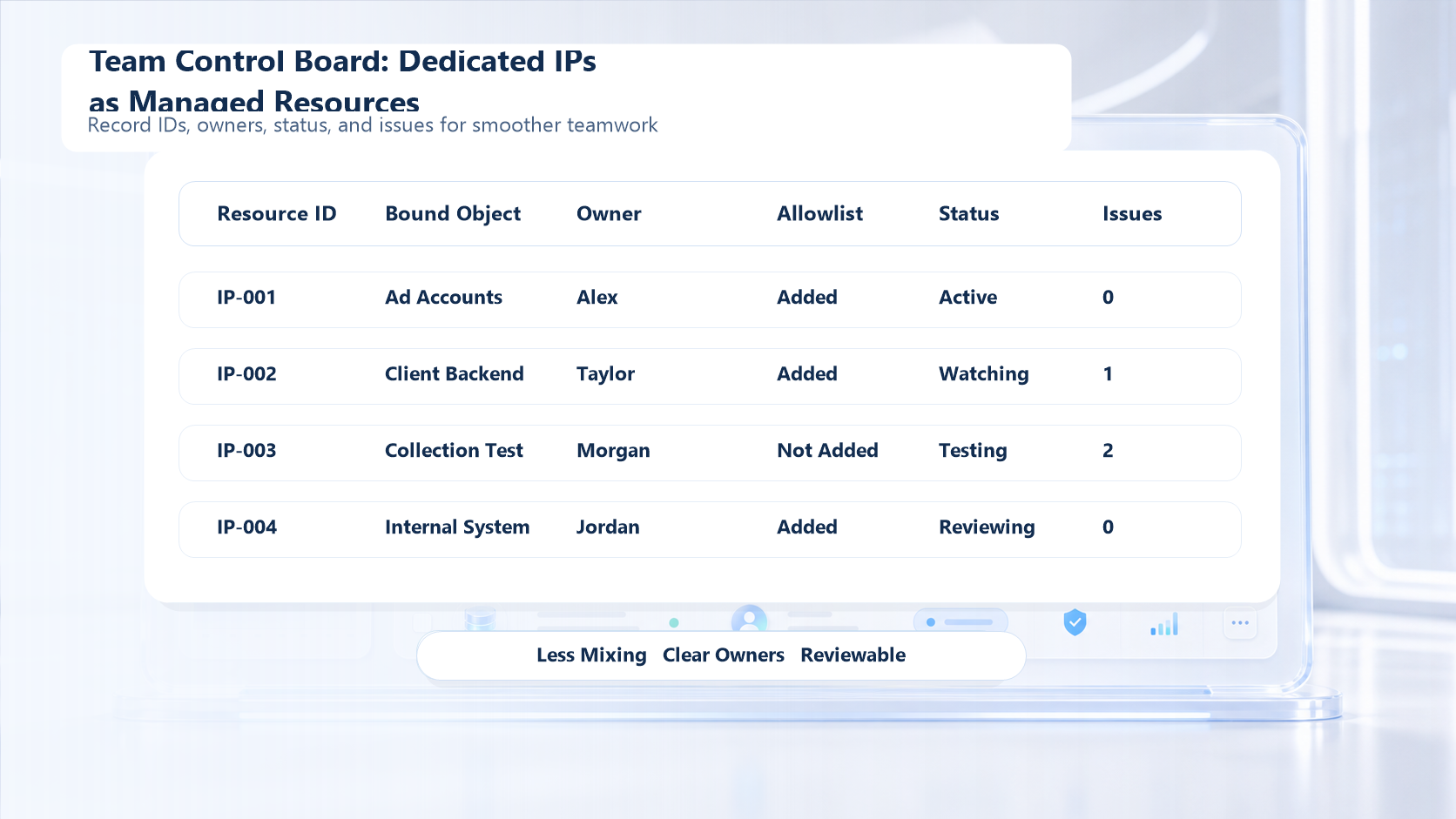
Use this lightweight board for team management:
Field
Description
Resource ID
Internal ID for dedicated proxy resources
Use case
Login, allowlist, collection, verification, or client project
Bound object
Which account group, system, or project
Owner
Main owner and backup owner
Access tools
Browser, fingerprint browser, script, or backend system
Current status
Testing, active, paused, or retired
Anomaly count
Recent failures and verification events
Review time
Scheduled decision on whether to keep using it
The goal of this board is not to create more management work. It is to turn a stable exit from a vague "address" into a manageable resource.
If your team uses multiple proxy types at the same time, you can also keep dedicated exits, static residential proxies, rotating proxies, and datacenter proxies in the same resource table. That makes later task selection much easier than asking "which one can we use?" every time.
Pre-Launch Checklist: Seven Questions That Catch Problems Early
Do not push a dedicated exit into large-scale use immediately after setup. Check the following seven questions first:
First, what task does this fixed exit serve?
If the answer is only "backup" or "everyone can use it," the scenario is still unclear. A dedicated resource works best when it is bound to one clear task.
Second, which accounts or systems is it bound to?
List the accounts, backend systems, and tool tasks. If a task is not on the list, do not connect it casually.
Third, does the region match the business target?
If you are handling a region-specific login, ad preview, or account operation, the exit region should match the business target. If the region does not match, the later test result may not mean much.
Fourth, have you completed tool-level testing?
Do not only check whether a web page opens. Confirm that all requests from the target tool are using the proxy. This matters especially for multi-module tools, automation scripts, and browser environments.
Fifth, have you completed business-action testing?
Logging in once, opening the backend once, or running one small task is more valuable than only checking whether the IP changed.
Sixth, have you documented the exception process?
If verification is triggered, access fails, speed drops, or the region is wrong, who handles it, how often it should be checked, and when it should be paused should all be pre-agreed.
Seventh, is there a retirement rule?
This line is not meant to be used forever. When the project ends, the account is retired, the allowlist is no longer needed, or anomaly frequency becomes too high, the resource should be reviewed.
You can turn those seven questions into a team checklist:
Check item
Pass standard
Is the task clear?
There is a specific business scenario
Is the bound object clear?
There is an account group, system, or project
Does the region match?
It matches the business target
Are the tools integrated?
All target tools route through the proxy
Is the business action verified?
A real small-scale task succeeds
Is the exception process defined?
There is an owner and a workflow
Is retirement defined?
The resource can be reclaimed after the project ends
Once this step is done, the dedicated resource is finally in a controlled state.
Stable Exit Is for Long-Term Use, Not Unlimited Reuse
The advantage of a dedicated exit is stability, but stability does not mean unlimited reuse.
Some teams think that once they have a dedicated address, they should use it for everything. That usually creates the opposite result. The more tasks share one exit, the harder it becomes to explain the network identity, and the harder it becomes to isolate problems.
The better approach is to allocate resources by task value:
Task type
Suggested usage
High-value accounts
Use a dedicated exit and keep the environment consistent
Internal system allowlists
Use a dedicated exit and document permissions
Client delivery projects
Isolate resources as much as possible for audit and traceability
Temporary testing
A lower-cost setup may be enough at the start
Large-scale collection
Often needs proxy pools and rotation strategies too
This is why a dedicated proxy should not be seen as the only answer to every proxy problem. It solves the problem of stable identity and clear ownership, not every problem of scale, speed, concurrency, or platform policy.
If your main goal is long-term fixed exits, account stability, IP allowlists, and client delivery, a dedicated resource is valuable. If your task is high-volume public page access, frequent region switching, or short-term experimentation, you may still need other proxy types alongside it.
For a deeper comparison of stable residential exits and long-term voice or browsing scenarios, you can also read What Is a Static Residential Proxy?.
Common Mistakes: You Bought the Exit, But Never Used the Value
Here are the most common mistakes teams make:
Mistake 1: only testing an IP lookup page.
An IP check page can only show that the exit changed. It cannot prove that the target business is stable. Correct testing should cover the target platform, the target account, the target tool, and the target action at the same time.
Mistake 2: mixing multiple high-value accounts on the same line.
If the accounts belong to different platforms, different clients, or different business types, mixing them increases debugging difficulty. High-value accounts should keep a more fixed use pattern whenever possible.
Mistake 3: treating a dedicated exit as a universal risk-control tool.
This line can improve network consistency, but it cannot replace account quality, operation discipline, platform policy understanding, or compliant usage.
Mistake 4: never reviewing the allowlist after the project ends.
Keeping access permissions alive after the project is done is a common risk. Allowlists should be reviewed regularly.
Mistake 5: not logging anomalies.
If verification, access failure, slow speed, or region mismatch happens, record it. Without logs, you have no basis for optimization.
Mistake 6: ignoring the difference between tools and tutorials.
The same proxy information can be entered differently in different tools. Browsers, fingerprint browsers, scripts, and client software all have their own configuration details. When in doubt, consult the IPIPD Proxy Tutorial Center instead of guessing.
Official Further Reading
If you want to understand dedicated IPs more systematically, read in this order:
The core value of a dedicated IP is not that it gives you "one more address." Its core value is that it gives key business tasks a more stable, traceable, and manageable network identity.
If your work is only temporary testing, you may not need a dedicated exit from day one. But if your work involves long-term account logins, IP allowlists, client delivery, internal system access, stable regional environments, or reproducible proxy workflows, a dedicated IP is worth configuring carefully.
The right way to use it is to place it into a complete workflow: define the task, bind the object, configure the tool, add the allowlist, complete business testing, log anomalies, and review it on a schedule. That is what turns a dedicated exit from a lonely resource into a stable piece of infrastructure your team can depend on.
Frequently Asked Questions
What should I do first after buying a dedicated IP?
First define which business scenario it serves, which account group or system it belongs to, which region it should match, and who owns it. Then configure the proxy and test the real business action.
Can one dedicated IP be used by multiple accounts?
It can, but it is not a good idea to let all accounts mix freely. A more stable approach is to group by platform, region, client, or business type.
Why is an IP allowlist better with a dedicated exit?
Because an allowlist needs a stable, recognizable, and manageable address. Shared exits may be used by many people, which makes change tracking and troubleshooting harder.
Does a dedicated exit guarantee account stability?
No. It only improves consistency at the network layer. Account stability also depends on device environment, browser fingerprint, behavior, account profile, platform rules, and login frequency.
Are dedicated exits and static IPs the same thing?
Not exactly. A static IP emphasizes that the address stays relatively fixed. A dedicated exit emphasizes that the usage relationship belongs to one user, account group, or task.